libbpf
首先介绍一下libbpf,libbpf是一个基于C语言的库,包含了一个BPF加载器。是一个比BCC还要新的BPF开发库。但是本质上依然是一个库,所以需要学习该库的使用方法。
该库的官方GitHub地址:https://github.com/libbpf/libbpf
其中存在一些官方的示例程序:https://github.com/libbpf/libbpf-bootstrap
minimal代码解析
之后会使用minimal这个程序来完整的学习libbpf的开发学习。参考着Makefile来一起进行讲解,首先是最开始的部分
1
2
3
4
5
6
7
8
9
10
11
12
13
14
15
16
17
18
19
20
21
22
23
24
25
26
| OUTPUT := .output
CLANG ?= clang
LIBBPF_SRC := $(abspath ../../libbpf/src)
BPFTOOL_SRC := $(abspath ../../bpftool/src)
LIBBPF_OBJ := $(abspath $(OUTPUT)/libbpf.a)
BPFTOOL_OUTPUT ?= $(abspath $(OUTPUT)/bpftool)
BPFTOOL ?= $(BPFTOOL_OUTPUT)/bootstrap/bpftool
LIBBLAZESYM_SRC := $(abspath ../../blazesym/)
LIBBLAZESYM_INC := $(abspath $(LIBBLAZESYM_SRC)/capi/include)
LIBBLAZESYM_OBJ := $(abspath $(OUTPUT)/libblazesym_c.a)
ARCH ?= $(shell uname -m | sed 's/x86_64/x86/' \
| sed 's/arm.*/arm/' \
| sed 's/aarch64/arm64/' \
| sed 's/ppc64le/powerpc/' \
| sed 's/mips.*/mips/' \
| sed 's/riscv64/riscv/' \
| sed 's/loongarch64/loongarch/')
VMLINUX := ../../vmlinux/$(ARCH)/vmlinux.h
INCLUDES := -I$(OUTPUT) -I../../libbpf/include/uapi -I$(dir $(VMLINUX)) -I$(LIBBLAZESYM_INC)
CFLAGS := -g -Wall
ALL_LDFLAGS := $(LDFLAGS) $(EXTRA_LDFLAGS)
APPS = minimal minimal_legacy minimal_ns bootstrap uprobe kprobe fentry \
usdt sockfilter tc ksyscall task_iter lsm
|
之后Makefile要将libbpf以及bpftool通过源代码给编译出来,并通过bpftool来将内核态的minimal.bpf.c的程序给编译出来minimal.skel.h的骨架头文件,最后被用户态的minimal.c的用户态程序给引入,从而完成用户态与内核态之间的通信。
1
2
3
4
|
$(OUTPUT)/%.skel.h: $(OUTPUT)/%.bpf.o | $(OUTPUT) $(BPFTOOL)
$(call msg,GEN-SKEL,$@)
$(Q)$(BPFTOOL) gen skeleton $< > $@
|
生成的skel头文件在.output目录下。
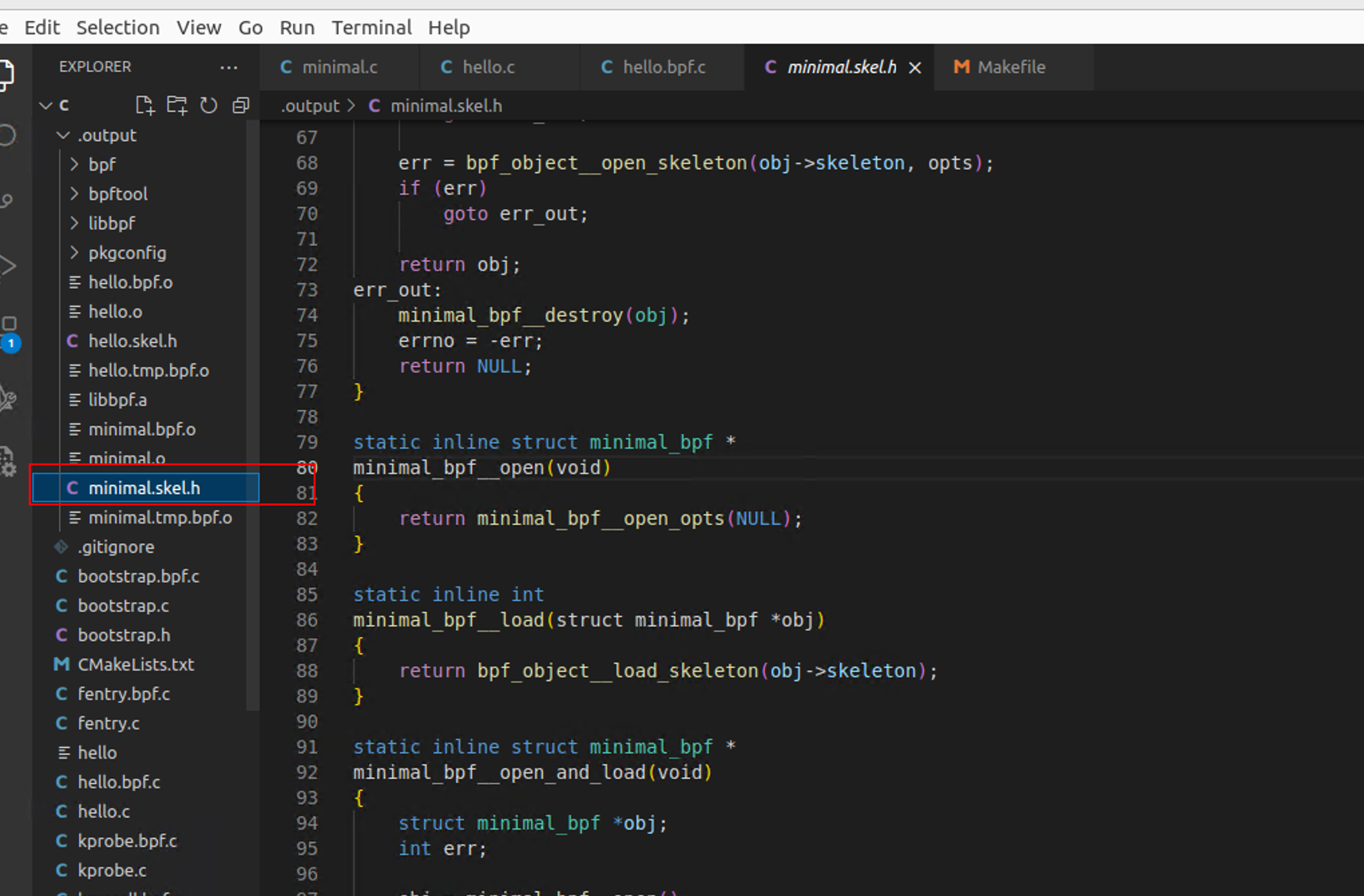
可以首先看minimal.bpf.c文件的内容,存在SEC()宏定义,首先是SEC("license")这个规定了BPF程序的license。在内核开发中,明确license是必须的。否则有一些功能是无法使用的,这个跟内核代码有关。之后就是SEC("tp/syscalls/sys_enter_write"),这个定义了内核程序的挂载点,其中tp就是tracepoint的简写,并且之后的syscalls/sys_enter_write可以在debugfs中找到对应的文件。/sys/kernel/debug/tracing/events/syscalls目录下的文件就是对应的挂载点。

1
2
3
4
5
6
7
8
9
10
11
12
13
14
15
16
| #include <linux/bpf.h>
#include <bpf/bpf_helpers.h>
char LICENSE[] SEC("license") = "Dual BSD/GPL";
int my_pid = 0;
SEC("tp/syscalls/sys_enter_write")
int handle_tp(void *ctx)
{
int pid = bpf_get_current_pid_tgid() >> 32;
if (pid != my_pid)
return 0;
bpf_printk("BPF triggered from PID %d.\n", pid);
return 0;
}
|
之后来看一下用户态的程序,来简单感受一下用户态程序和skel之间的关系。
1
2
3
4
5
6
7
8
9
10
11
12
13
14
15
16
17
18
19
20
21
22
23
24
25
26
27
28
29
30
31
32
33
34
35
36
37
38
39
40
41
42
43
44
45
46
47
48
49
50
51
52
53
54
55
56
57
| #include <stdio.h>
#include <unistd.h>
#include <sys/resource.h>
#include <bpf/libbpf.h>
#include "minimal.skel.h"
static int libbpf_print_fn(enum libbpf_print_level level, const char *format, va_list args)
{
return vfprintf(stderr, format, args);
}
int main(int argc, char **argv)
{
struct minimal_bpf *skel;
int err;
libbpf_set_print(libbpf_print_fn);
skel = minimal_bpf__open();
if (!skel) {
fprintf(stderr, "Failed to open BPF skeleton\n");
return 1;
}
skel->bss->my_pid = getpid();
err = minimal_bpf__load(skel);
if (err) {
fprintf(stderr, "Failed to load and verify BPF skeleton\n");
goto cleanup;
}
err = minimal_bpf__attach(skel);
if (err) {
fprintf(stderr, "Failed to attach BPF skeleton\n");
goto cleanup;
}
printf("Successfully started! Please run `sudo cat /sys/kernel/debug/tracing/trace_pipe` "
"to see output of the BPF programs.\n");
for (;;) {
fprintf(stderr, ".");
sleep(1);
}
cleanup:
minimal_bpf__destroy(skel);
return -err;
}
|
可以看到执行了skel = minimal_bpf__open();方法,该方法在skel代码中是被生成出来的。内部其实是调用了minimal_bpf__open_opts()方法。该函数其实就是操作声明的struct minimal_bpf *obj;,进行一系列操作时候将其返回。
1
2
3
4
5
6
7
8
9
10
11
12
13
14
15
16
17
18
19
20
21
22
23
24
25
26
27
28
29
30
| static inline struct minimal_bpf * minimal_bpf__open(void)
{
return minimal_bpf__open_opts(NULL);
}
static inline struct minimal_bpf * minimal_bpf__open_opts(const struct bpf_object_open_opts *opts)
{
struct minimal_bpf *obj;
int err;
obj = (struct minimal_bpf *)calloc(1, sizeof(*obj));
if (!obj) {
errno = ENOMEM;
return NULL;
}
err = minimal_bpf__create_skeleton(obj);
if (err)
goto err_out;
err = bpf_object__open_skeleton(obj->skeleton, opts);
if (err)
goto err_out;
return obj;
err_out:
minimal_bpf__destroy(obj);
errno = -err;
return NULL;
}
|
在这之中首先是执行了minimal_bpf__create_skeleton函数,其中新建了bpf_object_skeleton结构体。该结构体在libbpf.h中被声明定义。
1
2
3
4
5
6
7
8
9
10
11
12
13
14
15
16
17
| struct bpf_object_skeleton {
size_t sz;
const char *name;
const void *data;
size_t data_sz;
struct bpf_object **obj;
int map_cnt;
int map_skel_sz;
struct bpf_map_skeleton *maps;
int prog_cnt;
int prog_skel_sz;
struct bpf_prog_skeleton *progs;
};
|
首先将s->sz赋值是表示设置程序大小。下边的代码可以看到存在两个关键的位置一个是maps另外一个是programs。这两个关键的段。
maps是用于描述eBPF程序中使用的映射。eBPF映射(map)是一种在内核和用户空间之间共享数据的机制,通常用于存储和检索数据。
programs是一个包含eBPF程序段的数组,每个 bpf_prog_skeleton 结构体描述一个具体的 eBPF 程序。
1
2
3
4
5
6
7
8
9
10
11
12
13
14
15
16
17
18
19
20
21
22
23
24
25
26
27
28
29
30
31
32
33
34
35
36
37
38
39
40
41
42
43
44
45
46
47
48
49
50
51
52
53
54
55
56
57
58
59
60
61
62
| static inline int
minimal_bpf__create_skeleton(struct minimal_bpf *obj)
{
struct bpf_object_skeleton *s;
int err;
s = (struct bpf_object_skeleton *)calloc(1, sizeof(*s));
if (!s) {
err = -ENOMEM;
goto err;
}
s->sz = sizeof(*s);
s->name = "minimal_bpf";
s->obj = &obj->obj;
s->map_cnt = 2;
s->map_skel_sz = sizeof(*s->maps);
s->maps = (struct bpf_map_skeleton *)calloc(s->map_cnt, s->map_skel_sz);
if (!s->maps) {
err = -ENOMEM;
goto err;
}
s->maps[0].name = "minimal_.bss";
s->maps[0].map = &obj->maps.bss;
s->maps[0].mmaped = (void **)&obj->bss;
s->maps[1].name = "minimal_.rodata";
s->maps[1].map = &obj->maps.rodata;
s->prog_cnt = 1;
s->prog_skel_sz = sizeof(*s->progs);
s->progs = (struct bpf_prog_skeleton *)calloc(s->prog_cnt, s->prog_skel_sz);
if (!s->progs) {
err = -ENOMEM;
goto err;
}
s->progs[0].name = "handle_tp";
s->progs[0].prog = &obj->progs.handle_tp;
s->progs[0].link = &obj->links.handle_tp;
s->data = minimal_bpf__elf_bytes(&s->data_sz);
obj->skeleton = s;
return 0;
err:
bpf_object__destroy_skeleton(s);
return err;
}
|
之后执行了minimal_bpf__elf_bytes(&s->data_sz)函数,来获取eBPF程序的ELF文件字节数据,并将其大小存储在s->data_sz中。内容存储在s->data中。
1
2
3
4
5
6
7
8
| static inline const void *minimal_bpf__elf_bytes(size_t *sz)
{
static const char data[] __attribute__((__aligned__(8))) = "\
\x7f\x45\x4c\x46\x02\x01\x01\0\0\0eBPF程序字节码\0\0\0\0\0\0\x01\0\xf7\0\x01\0\0\0\0\0\0\0\0\";
*sz = sizeof(data) - 1;
return (const void *)data;
}
|
其实只需要理解内核态和用户态的程序即可。
minimal修改
监测点修改
要简单改写一下代码,首先修改内核态的代码,对openat这个系统调用进行监测,在进入和退出的时候就会打印。
1
2
3
4
5
6
7
8
9
10
11
12
13
14
15
16
17
18
19
20
21
22
23
| #include <linux/bpf.h>
#include <bpf/bpf_helpers.h>
char LICENSE[] SEC("license") = "Dual BSD/GPL";
int my_pid = 0;
SEC("tp/syscalls/sys_enter_openat")
int handle_tp_enter_openat(void *ctx)
{
int pid = bpf_get_current_pid_tgid() >> 32;
bpf_printk("Red256 Traced Enter openat ===> PID %d.\n", pid);
return 0;
}
SEC("tp/syscalls/sys_exit_openat")
int handle_tp_exit_openat(void *ctx)
{
int pid = bpf_get_current_pid_tgid() >> 32;
bpf_printk("Red256 Traced Exit openat ===> PID %d.\n", pid);
return 0;
}
|
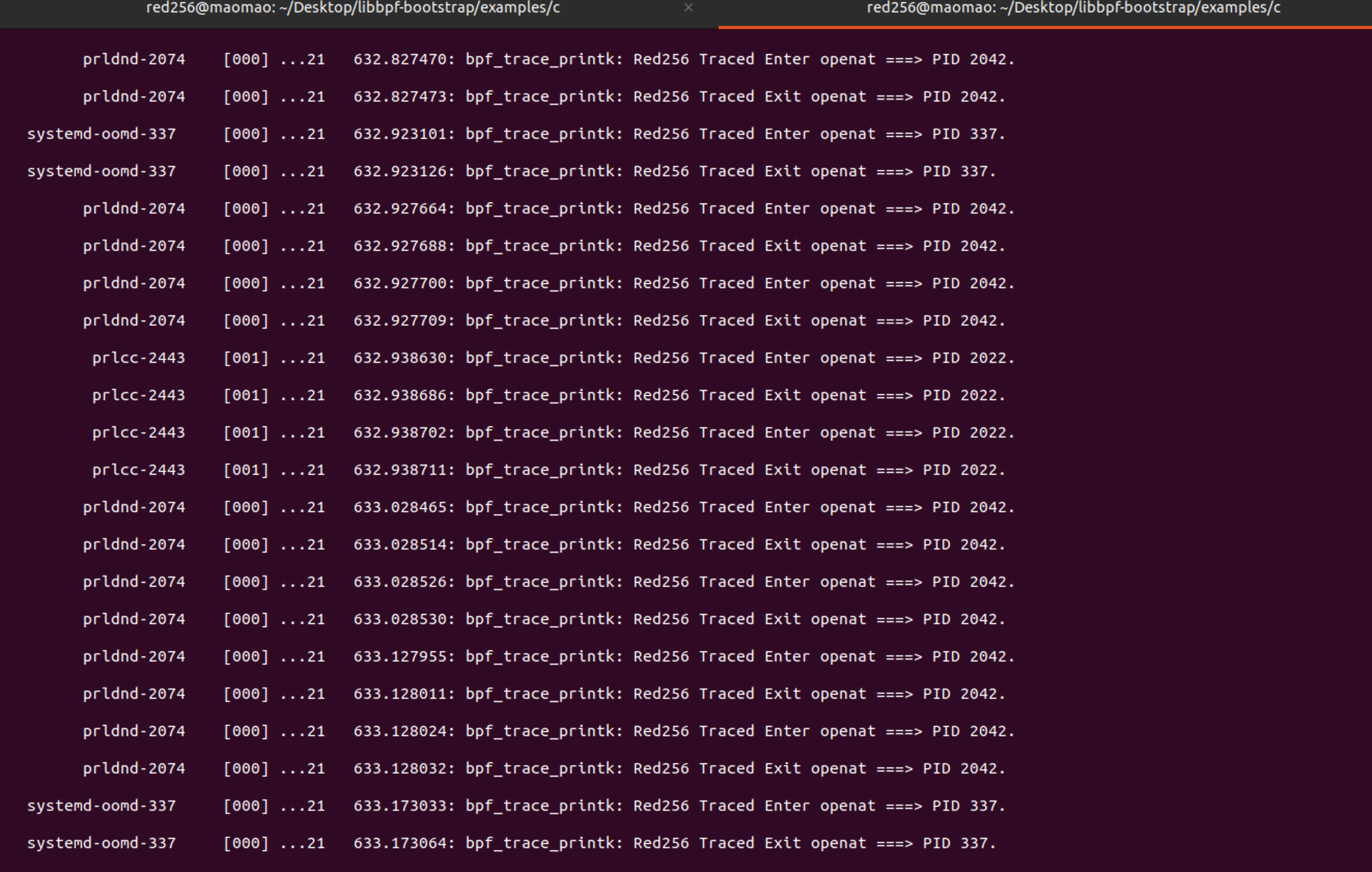
修改好了内核态的代码之后,暂时不需要修改用户态的代码,直接进行编译,然后执行就可以看到成功的对openat这个系统调用进行监测了。
用户态内核态参数传递
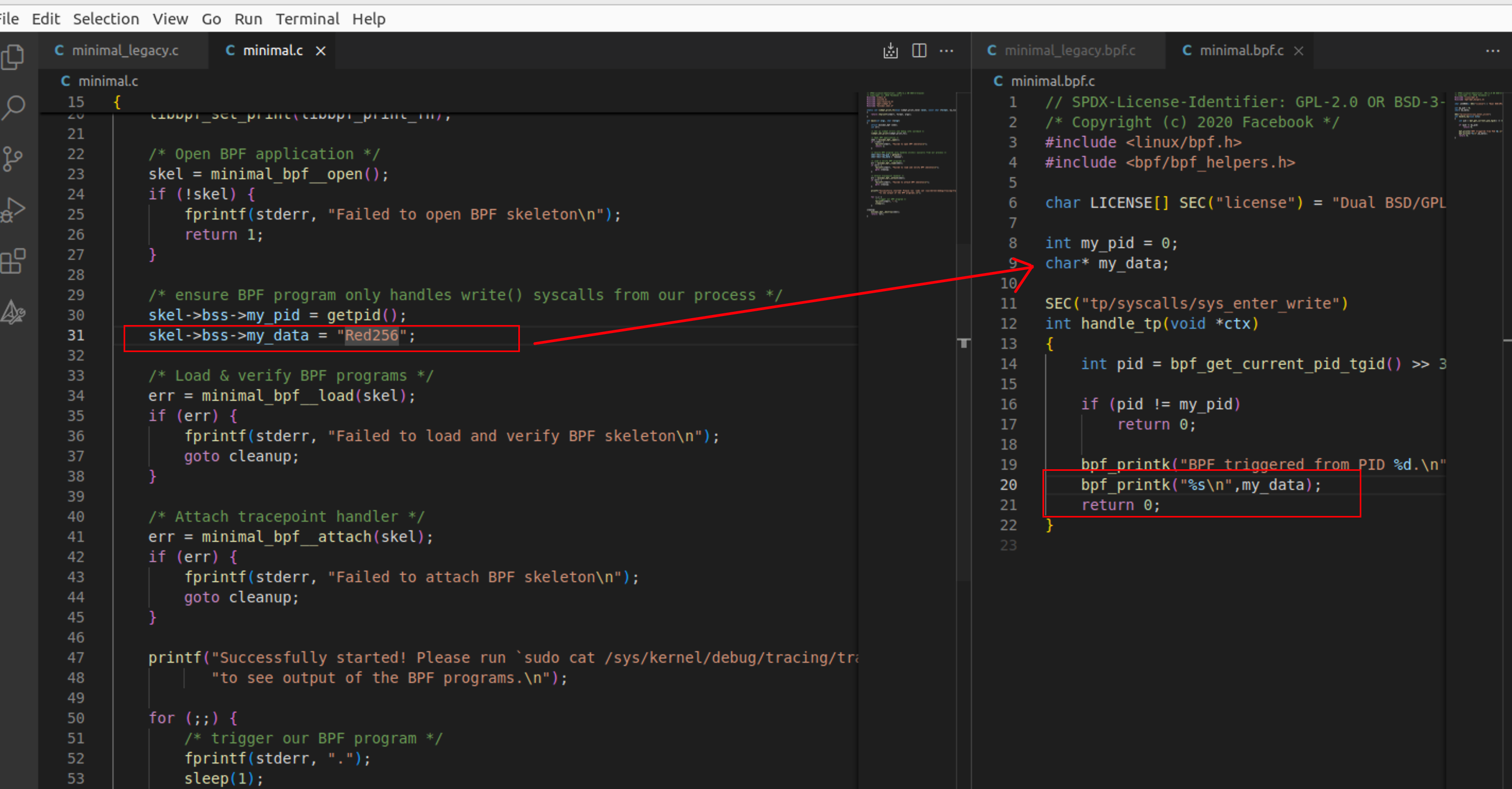
在样例程序中是通过bss段的变量进行赋值来从用户态给内核态传递参数的,也可以通过maps映射来实现用户态到内核态之间的数据传递。
在生成的skel中存在bss结构体,在其中存在my_pid以及my_data变量。
1
2
3
4
5
6
7
8
9
10
11
12
13
14
15
16
17
18
| struct minimal_bpf {
struct bpf_object_skeleton *skeleton;
struct bpf_object *obj;
struct {
struct bpf_map *bss;
struct bpf_map *rodata;
} maps;
struct {
struct bpf_program *handle_tp;
} progs;
struct {
struct bpf_link *handle_tp;
} links;
struct minimal_bpf__bss {
int my_pid;
char __pad0[4];
char *my_data;
} *bss;
|
在用户态程序中赋值好内容数据之后,直接可以load到内核态的程序中,进行使用。
可以结合minimal_legacy程序来进行分析。
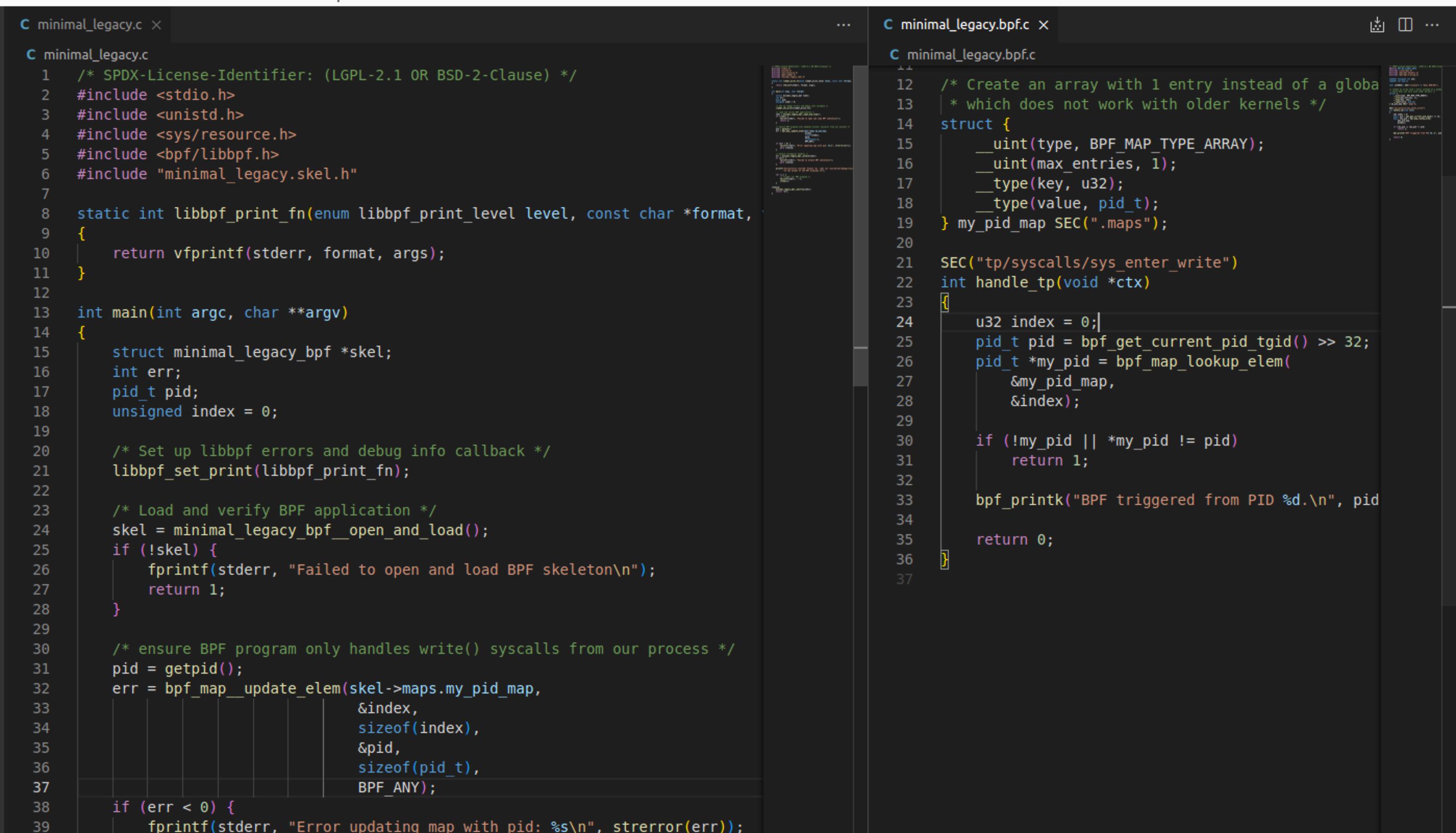
在内核态程序中存在结构体my_pid_map是它的名字,SEC(".maps")是将其定义为eBPF程序的映射。其他的内容是定义为BPF_MAP_TYPE_ARRAY的类型的映射,是一个基于数组的map,使用无符号32位整数作为键进行访问。max_entries表示map的最大条目数,之后就是key和value了。
1
2
3
4
5
6
| struct {
__uint(type, BPF_MAP_TYPE_ARRAY);
__uint(max_entries, 1);
__type(key, u32);
__type(value, pid_t);
} my_pid_map SEC(".maps");
|
在内核态中取数据是通过bpf_map_lookup_elem该方法来获取到的,就是在map中根据index去获取一个元素。
1
2
| u32 index = 0;
pid_t *my_pid = bpf_map_lookup_elem(&my_pid_map, &index);
|
用户态是通过bpf_map__update_elem函数对map进行赋值更新的,于是内核态的程序也可以通过map来获取到用户态的数据了。
- BPF_ANY:无论 key 是否存在,都插入或更新 map 中的元素。如果 key 已经存在,那么就更新相应的元素。如果 key 不存在,那么就创建一个新的元素。
- BPF_NOEXIST:只有当 key 不存在时,才插入一个新的元素。如果 key 已经存在,那么操作会失败。
- BPF_EXIST:只有当 key 已经存在时,才更新相应的元素。如果 key 不存在,那么操作会失败。
1
2
| pid = getpid();
err = bpf_map__update_elem(skel->maps.my_pid_map, &index, sizeof(index), &pid, sizeof(pid_t), BPF_ANY);
|
该函数的API是这么定义的
1
2
3
| LIBBPF_API int bpf_map__update_elem(const struct bpf_map *map,
const void *key, size_t key_sz,
const void *value, size_t value_sz, __u64 flags);
|
eBPF内核辅助方法
内核的辅助方法大概就是讲,程序在内核态的运行中并不能使用libc中的库函数,而是要自己去实现,但是不管是libbpf还是linux内核还是已经实现了一些辅助方法的,熟练的使用这些辅助方法可以帮助我们更加快速的进行开发。
参考链接:https://blog.csdn.net/qq_32378713/article/details/131744565
eBPF的map类型
bpffs
bpffs是linux系统的BPF文件系统,它的路径是/sys/fs/bpf,eBPF程序用到的map文件数据可以存储到这个文件系统中,即使内核态程序退出运行的时候,运行的数据也可以被存储在这个目录下,供用户态程序去使用。
案例的测试代码是map_pinning_save这个程序,代码如下,执行完之后会生成/sys/fs/bpf/my_array文件,这个my_array文件就是maps文件。
1
2
3
4
5
6
7
8
9
10
11
12
13
14
15
16
17
18
19
20
21
22
23
24
25
26
27
| #include <errno.h>
#include <stdio.h>
#include <string.h>
#include <bpf/bpf.h>
static const char *file_path = "/sys/fs/bpf/my_array";
int main(int argc, char **argv) {
int key, value, fd, added, pinned;
fd = bpf_map_create(BPF_MAP_TYPE_ARRAY, NULL, sizeof(int), sizeof(int), 100, 0);
if (fd < 0) {
printf("Failed to create map: %d (%s)\n", fd, strerror(errno));
return -1;
}
key = 1, value = 1234;
added = bpf_map_update_elem(fd, &key, &value, BPF_ANY);
if (added < 0) {
printf("Failed to update map: %d (%s)\n", added, strerror(errno));
return -1;
}
pinned = bpf_obj_pin(fd, file_path);
if (pinned < 0) {
printf("Failed to pin map to the file system: %d (%s)\n", pinned,
strerror(errno));
return -1;
}
return 0;
}
|
执行结果如下
1
2
| red256@maomao:~$ sudo ls /sys/fs/bpf/
my_array snap
|
然后从bpffs中取数据的操作就是
1
2
3
4
5
6
7
8
9
10
11
12
13
14
15
16
17
18
19
20
21
22
23
| #include <errno.h>
#include <stdio.h>
#include <string.h>
#include <bpf/bpf.h>
static const char *file_path = "/sys/fs/bpf/my_array";
int main(int argc, char **argv) {
int fd, key, value, result;
fd = bpf_obj_get(file_path);
if (fd < 0) {
printf("Failed to fetch the map: %d (%s)\n", fd, strerror(errno));
return -1;
}
key = 1;
result = bpf_map_lookup_elem(fd, &key, &value);
if (result < 0) {
printf("Failed to read value from the map: %d (%s)\n", result,
strerror(errno));
return -1;
}
printf("Value read from the map: '%d'\n", value);
return 0;
}
|
执行结果如下
1
2
| red256@maomao:~/Desktop/test_maps$ sudo ./map_pinning_fetch
Value read from the map: '1234'
|
可以使用bpftool来查看系统中现在存在的maps映射,其中可以看到value是d2 04 00 00,也就是十六进制的0x04d2 ===> 十进制的1234。
1
2
3
4
5
6
7
8
9
10
11
12
| red256@maomao:~$ sudo bpftool map list
2: prog_array name hid_jmp_table flags 0x0
key 4B value 4B max_entries 1024 memlock 8512B
owner_prog_type tracing owner jited
3: hash flags 0x0
key 9B value 1B max_entries 500 memlock 45312B
4: array flags 0x0
key 4B value 4B max_entries 100 memlock 1120B
red256@maomao:~$ sudo bpftool map dump id 4
key: 00 00 00 00 value: 00 00 00 00
key: 01 00 00 00 value: d2 04 00 00
key: 02 00 00 00 value: 00 00 00 00
|